










Firmware ASIC
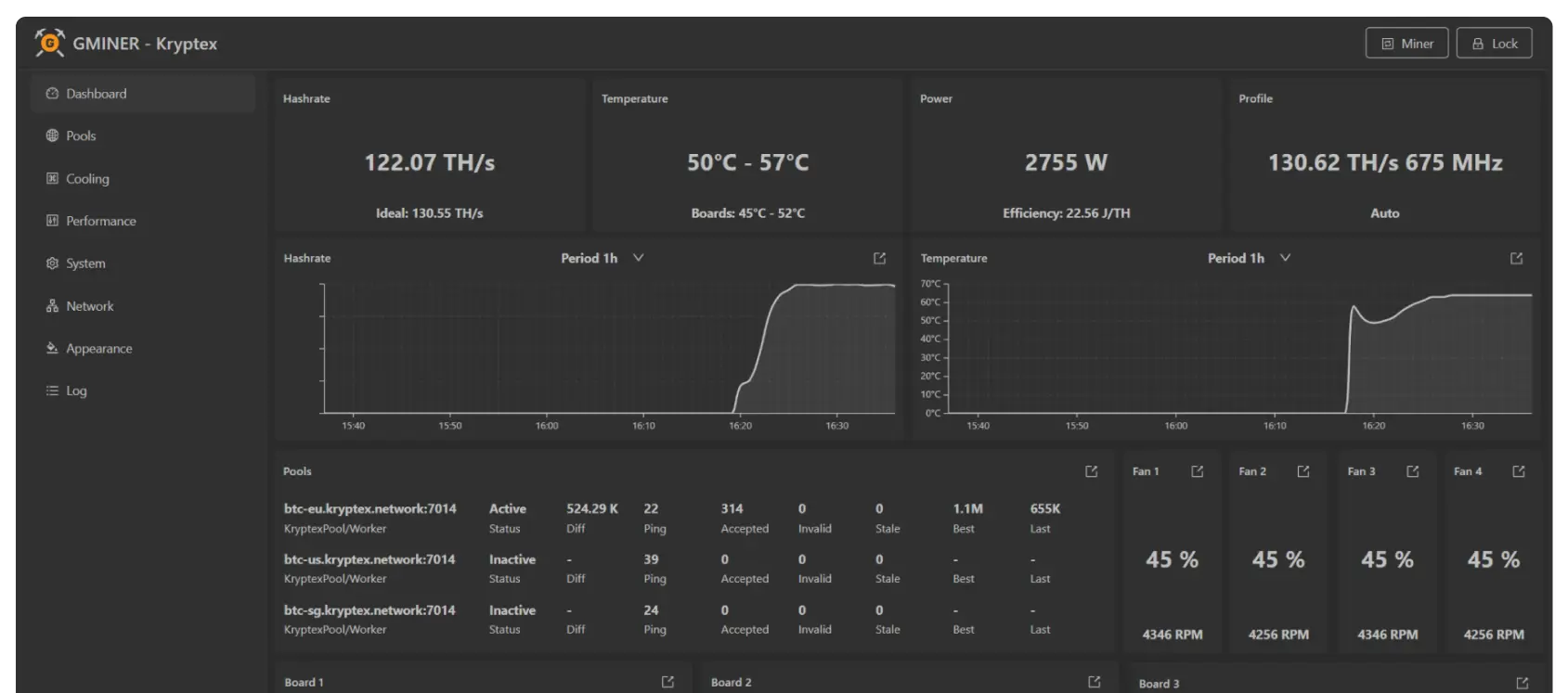
Maior hashrate, maior eficiência. O firmware seleciona o perfil de desempenho mais eficiente e aumenta o hashrate sem configuração extra.

Instalação
Guia Passo a Passo
Importante! para instalar o firmware Kryptex x GMiner use o Toolkit, o firmware ASIC deve ser anterior a março de 2024
2
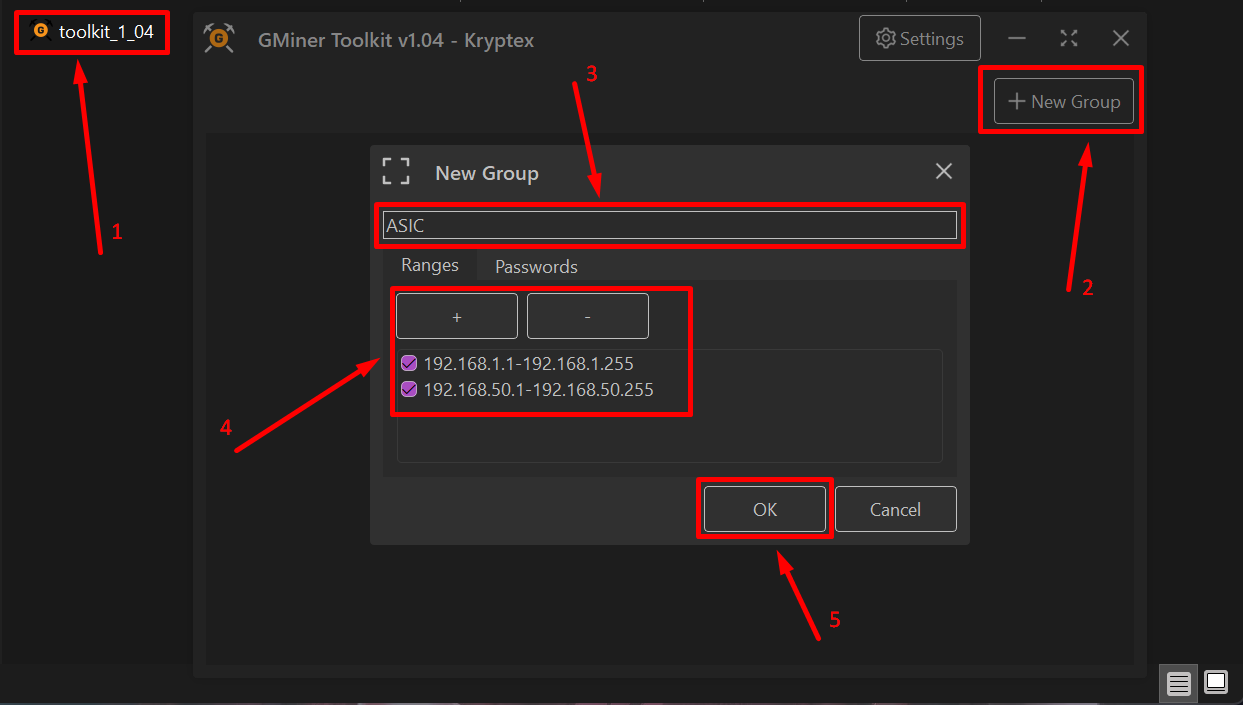
Abra o Toolkit → clique em “Novo Grupo” → insira um nome de grupo e o intervalo de endereços IP locais → clique em “OK”, depois “Escanear Rede Local”
3
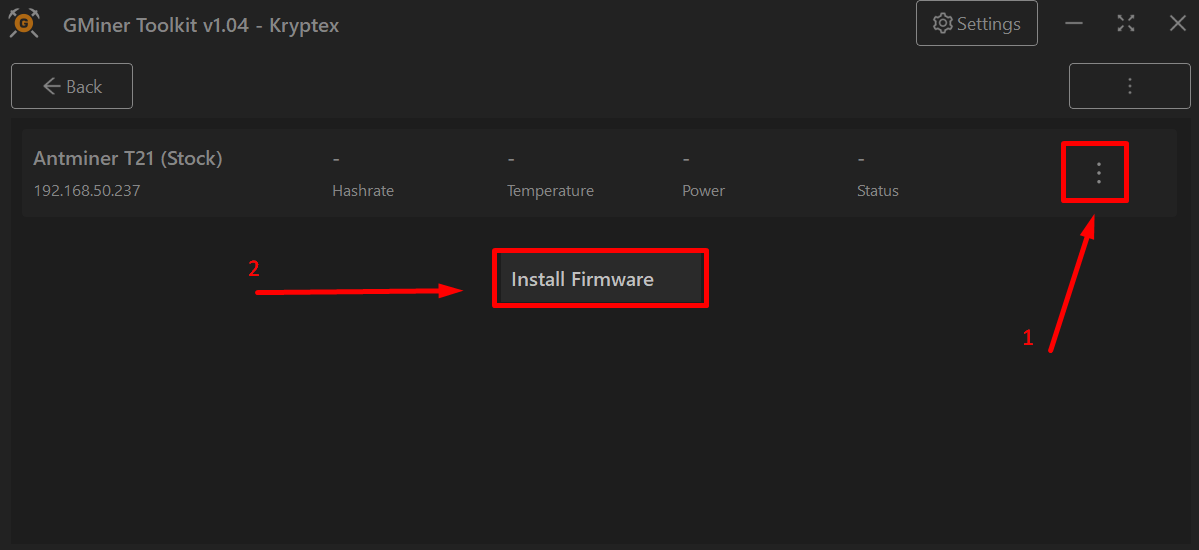
Selecione o novo grupo, escolha o ASIC da lista e clique em “Instalar Firmware”
4
Aguarde a conclusão da instalação, depois clique em “Concluído”
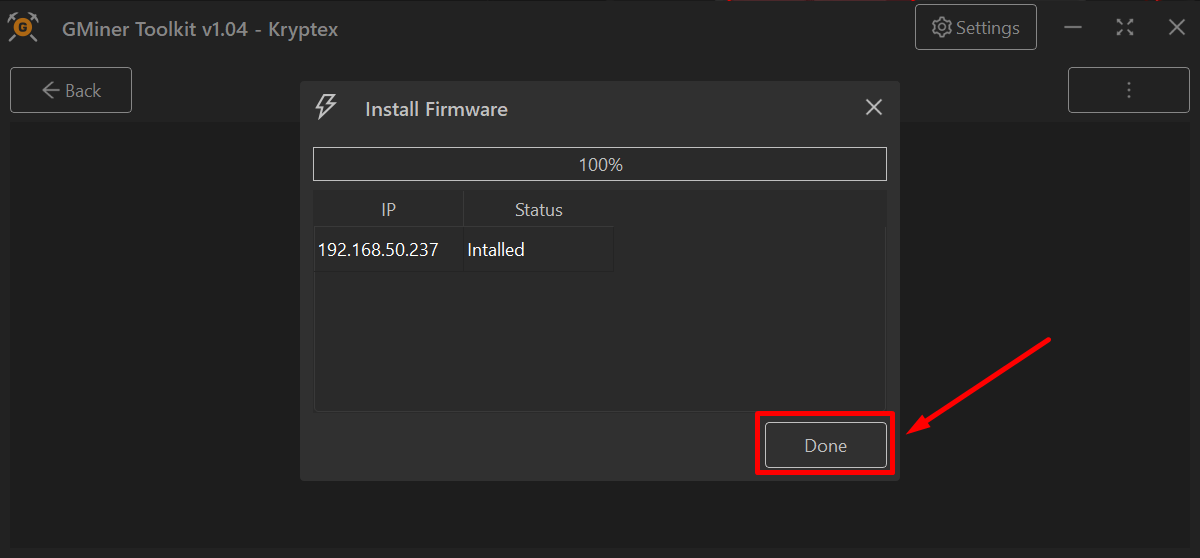
É isso – o novo firmware foi instalado e seu minerador irá reiniciar automaticamente.
Hardware Suportado
S19
BHB42801BHB42803BHB42811BHB42821BHB42831BHB42841
S19 Pro
BHB42641BHB42651
S19 Pro Hyd
HHB42602HHB42701HHB42711TH401
S19 Pro+ Hyd
HHB42601HHB42631
S19j+
BHB42701
S19j Pro
BHB42601BHB42603BHB42621BHB42631BHB42632
S19j Pro+
BHB42611BHB42612
S19 XP
BHB56601BHB56701BHB56801BHB56802BHB56806BHB68707BHB68709
S19 XP Hyd
HHB56601HHB56611HHB56613HHB56701
S19 XP+ Hyd
HHB68701HHB68703HHB68704H6HB68702
S19e XP Hyd
H6HB56702
S19j XP
BHB56804BHB56807BHB56814
S19k Pro
BHB56901BHB56902BHB56903BHB56906BHB56907
T19 Pro Hyd
HHB56702
S21
BHB68601BHB68603BHB68606
S21 Hyd
HHB68501HHB68502HHB68503HHB68504HHB68505HHB68601HHB68602
T21
BHB68701BHB68703BHB68705
S21 XP
A3HB70501A3HB70502A3HB705023A3HB70503
S21 XP Hyd
H6HB70501
S21 Pro
A3HB70601A3HB70602A3HB70603
S21 Pro Hyd
H6HB70601
S21 Pro+
A3HB70605A3HB70606A3HB70607
S21e XP Hyd
H6HB70602
S21+
A3HB70701A3HB70601A3HB70602A3HB70603A3HB70501A3HB70502
S21+ Hyd
H6HB70701H6HB70702H6HB70704H6HB70706
S21++
A3HB70705A3HB70707A3HB70708
S21e Hyd
H6HB70801H6HB70802
U3S19XP+H
H1HB68601
U3S19EXPH
H1HB56703
U3S21EXPH
H1HB70601
Placas de Controle Suportadas
BeagleBone
Xilinx 7007
Amlogic
Cvitek
Taxa de Desenvolvimento GMiner
3%
Registro de Alterações
1.32 (latest)
+Updated the web interface with an improved layout, better mobile usability, and quick actions
+Charts now keep their history across restarts, show restart reasons, and offer 3, 6, and 12 hour periods
+Expanded autotuning from 8 to 12 higher-performance profiles
+Added bulk chip frequency adjustment by ±5 MHz and reset to base frequency in manual mode, for all chips or a selected stability range
+Added PSU temperature monitoring for 11 APW11, APW12, and APW17 models: mining stops when the PSU overheats and resumes after it cools down
+Fixed an issue that caused voltage drops on some devices
+Added an option to disable PSU temperature sensor polling and overheat protection
+Added a configurable limit for automatic restarts on error, from 0 to 10 (default 3)
+Added support for the S21+ Hyd H6HB70706 hashboard and the APW11G1 and APW121215b power supplies
+Logs now download as a ZIP archive of plain-text .log files, and large logs are easier to view
+Improved filtering of invalid temperature sensor readings
1.30
+Added an option to automatically lower the frequency of hot chips on BM1368-based devices (T21/S21, S19 XP+, S19 XP+ Hyd)
+The Performance tab in the web interface now shows chip numbers and hardware errors
+Added sorting by temperature in Toolkit
+Added Cooling — Advanced and Performance — Advanced tabs in Toolkit for rarely used options such as quiet mode, hashboard cooling, and hot chip frequency reduction
+Added partner binding to Toolkit settings for GMiner partners
1.29
+Toolkit can now reflash Vnish to GMiner while keeping pools, cooling settings, performance profiles, and other settings
+Toolkit can now manage Vnish devices: change pools and passwords, switch between search and mining modes, reboot, and roll back to stock firmware
+During installation, Toolkit now applies the user-specified password if it differs from the default
+Restored the min/max temperature tuner profile settings removed in 1.27
+Widened the adjustment ranges for lowering and raising temperature tuner profiles
+Added separate minimum and maximum values for the random startup delay
1.28
+Added automatic startup on Cvitek control boards without Toolkit
+Install the firmware once and it starts with the ASIC automatically, including after a reboot
1.27
+Added a built-in task scheduler: schedule profile changes, sleep mode, and device reboots
+The scheduler runs directly in the firmware and does not require Toolkit to stay running on the network
+Schedules can be configured through the device web interface, with bulk configuration available through Toolkit
+Added support for Antminer S21++ (A3HB70705, A3HB70707, A3HB70708)
1.26
+Added support for Antminer S21 Pro+ with 65 BM1370 chips: A3HB70605, A3HB70606, and A3HB70607
1.25
+Added support for installation over newer Bitmain stock firmware released since September 2025
+Improved autotuning stability, especially on BM1366-based S19k Pro and S19 XP models
+Improved handling of unstable or degraded chips
+Fixed temperature readings on S21 XP
+Added an option in Toolkit to clear saved autotuning results
1.24
+Completely reworked autotuning
+The firmware now continues optimizing chips during mining
+Added voltage adjustment in 0.01 V steps
+Added automatic detection and adjustment for problematic chips, temperature changes, and cooling conditions
1.23
+Added stock firmware management through Toolkit: pool settings, password changes, reboot, and Blink
+Added support for Antminer API and BTC Tools
+Improved API security, Hydro model compatibility, and network scanning
+Added an offline status
1.22
+Added support for S21+ Hyd (H6HB70701, H6HB70702, H6HB70704), S21e Hyd (H6HB70801, H6HB70802)
+Added support for APW11G0 power supply
+Possibility to disable hash boards cooling stage
+Improved miner stability
1.20
+Added support for Hiveon ASIC Hub
+Added coloring of heatmap according to the temperature of the chip
+Added use of the device serial number in the status
+Added support for APW111721b and APW111721c power supplies
+Added support for T19 Pro Hyd (HHB56702)
+Added support for S19 Pro Hyd (HHB42602, HHB42701, HHB42711, TH401)
+Added support for S19 Pro+ Hyd (HHB42601, HHB42631)
+Added support for S19 XP Hyd (HHB56601, HHB56611, HHB56613, HHB56701)
+Added support for S19 XP+ Hyd (HHB68701, HHB68703, HHB68704, H6HB68702)
+Added support for U3S19XP+H (H1HB68601)
+Added support for S19e XP Hyd (H6HB56702)
+Added support for U3S19EXPH (H1HB56703)
+Added support for S21 Hyd (HHB68501, HHB68502, HHB68503, HHB68504, HHB68505, HHB68601, HHB68602)
+Added support for S21 Pro Hyd (H6HB70601)
+Added support for S21e XP Hyd (H6HB70602)
+Added support for S21 XP Hyd (H6HB70501)
+Added support for U3S21EXPH (H1HB70601)
1.19
+Extends the voltage limits for power supplies (allows to select higher profiles for autotuning)
+Added S19k Pro submodels: BHB56906, BHB56907
+Added an option to set the time zone (correct time in downloaded logs)
1.18
+Added chips heatmap for S21 Pro and S21 XP
+Added support for the S19 XP+ (BHB68707, BHB68709)
+Added support for the S21 XP submodel (A3HB70503)
+Added display of ambient temperature for Amlogic control board (S21+, S21 Pro, S21 XP)
+Improved compatibility with the APW121215E power supply
+Added toolkit statistics export to a .CSV file
+Added display of error/warning in the web interface page header
+Added support of older OS for Toolkit (Windows 7 without Direct3D 12)
+Decreased Toolkit executable size by 10Mb, current Toolkit size is 37Mb (offline installer with embedded firmware for all control boards)
1.17
Toolkit:
+Added display of hashboard status, allows viewing errors by hashboard
+Added the ability to enable/disable miner search mode
Miner:
+Improved compatibility with power supplies
+Added backup saving for EEPROM, allowing the miner to start even if there are EEPROM issues
+Improved network connection failure handling logic
Web Interface:
+When switching performance profiles in manual temperature tuning mode, the selected temperature tuner settings are saved
1.16
+Improved fan control algorithm in auto mode
+Added the ability to configure the following options in the Toolkit: quiet fan mode, do not stop mining when the internet connection is lost
+Improved support for S21 Pro and S21 XP devices
1.15
+Added quiet fan mode (fan speed 50% while hash board cooling)
+Added option to allow mining without internet (allows keep ASIC at working temperature)
+Improved compatibility with mining pools
1.14
+Added S21+ submodels support: A3HB70601, A3HB70602, A3HB70603, A3HB70501, A3HB70502
1.13
+Added the ability to install GMiner on Bitmain stock firmware from late February 2024, including firmware from 2025 (no longer required to downgrade the stock device to an older firmware version)
+Improved logic for returning from a backup pool to the main
+Added S21+ submodels support: A3HB70702, A3HB70703
1.12
+Improved logic for switching to backup pools, detects domain blocking by the provider and switching to the next pool
+Reworked the option to ignore broken temperature sensors. Now, at least one working temperature sensor is required for mining. Specifying a minimum number of working sensors is no longer required
+Added an option to enable/disable DNS over HTTPS, allowing you to hide pool addresses from the provider
